amd data change update new data to dmi update success что делать
update new data to dmi что это значит и что делать?
 Всем привет
  Значит что это за проблема? У вас есть комп, вы его включаете, мелькает на экране надпись update new data to dmi и потом комп грузится и все вроде норм… Но вот надпись, что же она значит? А может что не ладное? Я решил разобраться с этим делом
Ребята, первая инфа, которую я нашел, то она такая. Вроде как надпись update new data to dmi имеет отношение к жесткому диску и сама надпись сообщает о том, что в жестком есть какая-то проблема. Данная инфа, ну что есть проблема, то эту инфу сообщает технология S.M.A.R.T., которая вшита почти в каждом жестком диске. Это первая версия. Дело в том, что у одного чела эта надпись была, но вот когда он один жесткий поставил в другой комп, то надписи уже не было.. Понимаете? 
Итак, копаю инфу дальше. Вот еще интересный момент, пишет чел, что надпись эта бывает только при перезагрузке, но не при включении компа. Интересно конечно.. 
Другой человек также написал, что у него такая же ерунда. В режиме AHCI при перезагрузке выдается сообщение S.M.A.R.T. error, а если выключить комп и потом включить, то такой надписи нет. Хотя чел пишет что жесткий диск новый, никаких проблем с ним нет, работает идеально..
Также подтвердилась информация, что это не касается прошивки биоса. Ибо вышла новая версия биоса, но надпись осталась на месте.. 
И еще понял, что данная надпись встречается у многих юзеров, и пока что решение не найдено. Ищу инфу дальше…
Еще узнал что бывает такая надпись, вот как AMD data change update new data to DMI. Ребята, вот именно по этой надписи решение вроде нашел. Ну я имею ввиду там где упоминается AMD. Короче один чел на форуме написал что нужно установить утилиту по обновлению BIOS, далее запускаете ее и ставите галочку Load CMOS default after BIOS update и обязательно еще ставите галочку Clear DMI data Pool. Далее нужно перезагрузиться, сообщение еще один раз может показаться, но потом его уже не будет. Эта инфа касается плат от компании Gigabyte, учтите! Вот такое решение, так что все таки дело в версии биоса… 
Ну а вот пример надписи, как она на экране смотрится, гляньте:


Еще некоторые мои мысли на этот счет:
update new data to dmi update success
k8 npt data change update new data to dmi update success
amd data change update new data to dmi
я не встречал упоминание Intel, поэтому смею предположить, что дело касается только платформы AMD;
Также юзерам интересно, как переводится update new data to dmi? С этим вопросом я отправился в гугловский переводчик, вставил там update new data to dmi:

И получил такой перевод:

При этом я сразу поискал инфу в интернете о том что такое DMI, и очень быстро нашел ответ:

Вот такие дела. По поводу той инфы, ну что я писал, что нужно обновить биос при помощи утилиты, то эта инфа была представлена именно как решение проблемы. Саму инфу нашел на авторитетном форуме. И я думаю что имеется ввиду утилита от фирмы Gigabyte для материнок платформы AMD, ибо упоминаний Intel, Asus, MSI ну или других производителей я не встречал.
Такие дела ребята. Надеюсь инфа пригодится. Удачи! 
Ошибка Amd data change. Update new data to dmi! Update success. Не загружается Windows
Помощь в написании контрольных, курсовых и дипломных работ здесь.
K8 NPT Data change. Update new data to DMI
K8 NPT Data change. Update new data to DMI А чтоо именно это означает? Ибо я наткнулась на.
Verifying dmi pool data/ verifying dmi pool data update success при загрузке
проблема следующая. WIN 7 home pro x32 хард WD5000AAKX видюха gt 520 привод ДВД сата мать.
Добавлено через 1 минуту
Решение
Не загружается Windows 7: виснет после выдачи информации о железе с надписью: «Verifying DMI Pool data»
Привет всем! Собственно такая проблема: Не загружается Windows 7, при старте системы после вывода.
Подтверждение Данных Накопителя DMI (verifying DMI Pool data)
В ключаю пк идет загрузка и выдает Подтверждение Данных Накопителя DMI (verifying DMI Pool.
Не получается использовать формулу в UPDATE, Data truncated for column
И так есть Field покоторому сортируются данные в таблице, естественно туалет всегда должен быть в.
Подскажите. Ошибка. verifying dmi pool data. Что делать?
Значит случилась такая ситуация. Решил подарить жизнь старому компу. Ну как старому. 2008 год.
Verifying DMI Pool Data в чём может быть ошибка
Добрый день, взял компьютер в ремонт, никогда с такой проблемой не сталкивался. Почему выдаёт такую.
 Dmi pool data или ошибка 0xc0000001 winload.exe
Доброго времени суток господа, мое почтение. Ну к сути! Купил пк мать gigabyte, озу 2 канала по.
Comp wont boot and says «AMD Data Change. Update New Data to DMI!»
ttoonnyy
New Member
Basically, I get that message «AMD Data Change. Update New Data to DMI!» then it just hangs there no matter how long I leave it.
I’ve been reading this post as it’s the only thing I could find on the net about my problem.
Unfortunately some smartypants decided to close the thread (or set automatic thread closing) so no reply notifications can go directly to the people originally dealing with the problem, leaving us with no choice but to have a duplicate thread and a restart on the expertise involved in solving it 
So here it goes.
I appreciate any time you put in to helping me here. Also, it is quite urgent as I’m the lead modeller on Cypherium and am falling behind schedule.. so if you want to play it sooner you’l help me get this working faster 
What’s changed since the last successful boot:
Windows Firewall enabled.
Powerquest Partition Magic and their Diskkeeper software that comes with it: PM said it has compatibility issues, opened it but did nothing with it.
Diskkeeper wanted to just back up my system to a floppy drive.. Don’t have a floppy drive. Closed it.
About 10 hours later it was still working perfectly, I turned off the computer and went to sleep.
Hardware has not changed at all.
Other recent history:
Installed several programs of the Adobe CS5 Creative Suite.
Had a major virus outbreak on another computer using AVG (this one uses Norton), and have copied files between them despite reappearances of the viruses.
1TB SATA HDD (Partitioned to 100gb (C  for Windows XP SP3 x32, the first OS installation, and 900gb (E for data.
40GB IDE HDD for Windows 7 Pro x64, second OS installation
ATI Radeon HD5670
Gigabyte Motherboard
8GB PC3 RAM
AMD Quad Core x64 2300mhz
(Will look for more detailed names if anyone thinks it necessary; just say so)
Testing each RAM chip on it’s own:
«AMD Data Change. Update New Data to DMI! Update Success» but still does nothing more than sit there.
Booting from boot menu on both disks:
Same as above.
Disconnecting both HDDs:
Original error is still there and of-course the NTLDR error which I fix by reconnecting them in the right order.
Rebooting 50 times:
Same error.
Loading Fail-Safe Defaults in BIOS:
Same error.
Loading Optimized Defaults in BIOS:
Same error.
Searching Google for solutions/Technical Support:
Seems nobody wrote one yet. And screw Gigabyte’s technical support. Any company will take days to reply and probably just tell me to try something I already tell them I tried followed by a load of advertising.
Tips from the thread linked at the top that I don’t understand/couldn’t try/can anyone explain how?
That’s all I can think of that you need to know.. any ideas plz?
Thanks for your time =),
Tony



95Viper
Super Moderator
Just wondering?
Did you try reading the manual (motherboard or system(for a pre-built) on how to Flash(update) the bios and\or clear the CMOS(bios).
Fill out the System Specs in the User CP(control panel) asnd click the show box. It will probably be helpful to the people that wish to help.
Oh, and, Welcome to TPU the best tech site on the Web!
ttoonnyy
New Member
Whats CMOS? And I have a lot of valuable data on the HDDs in this computer.. but HDDs seem unrelated to the problem.
Just wondering?
Did you try reading the manual (motherboard or system(for a pre-built) on how to Flash(update) the bios and\or clear the CMOS(bios).
Fill out the System Specs in the User CP(control panel) asnd click the show box. It will probably be helpful to the people that wish to help.
Oh, and, Welcome to TPU the best tech site on the Web!
I don’t have a floppy drive and sorry, I feel like i’ve been poked in the eye when someone tells me updating it will fix it when it worked without an update haha. Anyhow it’s a new system so I probably have the latest version.
Havn’t read the manual, I don’t even know what these technical terms even mean.. >.

slyfox2151

make sure your bootup options are set correctly in the bios. definetly sounds like thats the problem.
are your HDDs Sata or IDE. if there IDE. maybe there both set to master or some such and the bios cant work out what to boot from.

streetfighter 2
New Member
Clear the CMOS (like Hecky said) and clear the ESCD as well. The ESCD may need to be flushed from within the BIOS because clearing the CMOS does not always wipe ESCD data.
Clearing the CMOS is absurdly easy. You pull a jumper and place it on neighboring pins for about 4 seconds, then put it back. The process is the same for 99% of mobos. Please check your mobo manual to find the CMOS jumper and instructions on how to do it.
If that doesn’t work update the BIOS.
You can check your BIOS version by pressing the Pause|Break key (assuming a standard keyboard) when your BIOS first posts. There should be a line that has the BIOS release date and version when you pause it. Copy them both down then check on your mobo manufacturers site for updates. Pressing Pause|Break again will resume the POST operation.
The CMOS, which is a bit of a misnomer, is essentially the chip which holds your BIOS settings. My definition is not technically accurate but it is functionally accurate.
I would agree, the HD should be unrelated to the problem, but it’s impossible to know for sure. If you’re very worried about your HDs I suggest disconnecting all but your primary HD until the problem is resolved.
You can use a jump drive as a boot device and flash your BIOS. It’s very easy to do. Tutorial here.
EDIT: Welcome to TPU!
ttoonnyy
New Member
make sure your bootup options are set correctly in the bios. definetly sounds like thats the problem.
are your HDDs Sata or IDE?
What’s «set correctly?»
How they came as (probably Optimized Defaults right?) worked fine.
Have tried optimized and fail-safe defaults of BIOS settings, and have one each of IDE and SATA drives.
Clear the CMOS (like Hecky said) and clear the ESCD as well. The ESCD may need to be flushed from within the BIOS because clearing the CMOS does not always wipe ESCD data.
Clearing the CMOS is absurdly easy. You pull a jumper and place it on neighboring pins for about 4 seconds, then put it back. The process is the same for 99% of mobos. Please check your mobo manual to find the CMOS jumper and instructions on how to do it.
If that doesn’t work update the BIOS.
You can check your BIOS version by pressing the Pause|Break key (assuming a standard keyboard) when your BIOS first posts. There should be a line that has the BIOS release date and version when you pause it. Copy them both down then check on your mobo manufacturers site for updates. Pressing Pause|Break again will resume the POST operation.
Ok I’ll assume a jumper is one of those 2-pin motherboard plug thingys that come all random colours rite? N like you put on an HDD to set it’s master/slave status?
Assuming that’s correct, which one do I pull, neighboring pins of what, which side, how vital is it exactly 4 seconds, what happens if I mess it up, and what happens if I succeed?
Also I’ve had a look through the entire BIOS settings and can’t find one mention of «ESCD», though someone did mention in another post to «Disable ESCD Updates» in BIOS, which I also couldn’t find.

francis511
| Processor | Core I5 4440 / 4430 |
|---|---|
| Motherboard | Asus z87-k / Gigabyte ga h97- d3h |
| Cooling | Arctic freezer / Generic |
| Memory | 8 gb Mushkin / Various |
| Video Card(s) | Radeon 7850 cf / Gtx 690 |
| Storage | Samsung 850 EVO 250 gb / 2×1 terabyte hdds Wd 256 gb nvme |
| Display(s) | Technika 32″ / Asus 24` ips |
| Case | Corsair |
| Audio Device(s) | X-fi Titanium |
| Power Supply | Corsair 850 w |
| Software | Windows 10 |
streetfighter 2
New Member
I think slyfox2151 was being a little vague but he’s still technically correct. «Optimized Defaults» or even plain old «Default» should be acceptable.
You are correct sir. Though SATA HDs aren’t as likely as IDE drives to have jumpers, and they serve different purposes.
As I said earlier, consult your manual. It’ll should have a very evident section on «Resetting CMOS» or «Clearing CMOS» or something of that nature.
In answer to your questions: You have to be within 6ms of 4 seconds, I’m selling bridges too if you’re interested. If you succeed nothing happens, but it might fix the problem. If you fail nothing happens and it won’t fix the problem.
Just remember to power off the computer and unplug the power cable.
Well then I wouldn’t worry about it.
ttoonnyy
New Member
ttoonnyy
New Member
I think slyfox2151 was being a little vague but he’s still technically correct. «Optimized Defaults» or even plain old «Default» should be acceptable.
You are correct sir. Though SATA HDs aren’t as likely as IDE drives to have jumpers, and they serve different purposes.
As I said earlier, consult your manual. It’ll should have a very evident section on «Resetting CMOS» or «Clearing CMOS» or something of that nature.
In answer to your questions: You have to be within 6ms of 4 seconds, I’m selling bridges too if you’re interested. If you succeed nothing happens, but it might fix the problem. If you fail nothing happens and it won’t fix the problem.
Just remember to power off the computer and unplug the power cable.
Ok, I tried that a few times.. Btw, just an act of stupidity, but if u tap the CMOS reset while computer is on, it actually does it..
I flashed the update thingy with the interface for doing so as directed in the manual, however it didn’t go as per the instructions.. Like it told me I’d have to press a key to continue where I didn’t, afterwards there was no confirmation, the box just disappeared, all just subtle differences.
There’s also a Quick Flash function which also didn’t fix it. That should be enough flashing right? Well anyhow, I tried to flash it from the USB Boot disk, no luck either.
As a side thought, there are extra functions in DOS for me:
I DIR to see the files on the disk as instructed to put there.
AUTOEXEC.BAT (autoruns the EXE with the FB8 and flashes when I boot from the drive)
M770TUD3.F8B (the flash’s data that the Flash ultility wanted)
FLASHSPI.EXE
So I go like this:
FLASHSPI.EXE/M770TUD3.FB8
And it says it can’t read the BIOS File.
I do the same again with the above commands after it and it that Flashes again and performs the extra function.
Should I try these one at a time, in a certain order, or not at all?
Edit: FLASHSPI.EXE/M770TUD3.F8B/C/E/D didn’t help.
Well then I wouldn’t worry about it.
Also, what francis511 said. 99% of problem posts here could be resolved by someone saying, «LMGTFY». If you don’t know what that means, google it. 
Lol xD ah I solve 9/10 problems like this that way, but the problem is you can’t have a discussion with Google when a problem is too complicated and nobody seems to have solved it yet. Every thread or mention I can find about this has a solution I’ve already tried or went inactive
Thanks for your time guys, I really do appreciate it. I know how frustrating this stuff is and it’s not like I’m paying for your assistance.
Edit: One thing to note is that the mobo brags it’s «DualBios». Sais it has a backup BIOS or something. I’m totally new to anything to with with motherboards so I don’t know what this implies on my situation. Is is possible this means that somehow my backup BIOS is fucked and thats something that can’t be fixed plus it being broken means no BIOS can work? Lol I seen no settings whatsoever about a second BIOS.
Проблема Verifying DMI Pool Data как исправить?
Добрый день, сегодня мы разберем интересную ошибку, которая в основном связана с аппаратной частью компьютера. Итак, при включении компьютера можно увидеть следующую надпись на черном фоне монитора: Verifying dmi pool data. На какие-либо действия со стороны пользователя компьютер не реагирует, то есть, нажатия клавиатуры, перезагрузку, ничего не помогает. Такая проблема появляется чаще от вмешательства в системный блок, чтобы почистить компоненты от пыли и грязи, либо из-за добавления комплектующих, которые плохо вставлены в свои разъемы и порты, либо вообще не подходят для вашего компьютера в целом.
В данной статьей я хочу помочь избавиться от ошибки Verifying DMI Pool Data, но для начала подробнее разберем причины возникновения и, что это вообще за ошибка такая.
Значение ошибки Verifying DMI Pool Data
Если кратко, то после нажатия на кнопку включения ПК производится проверка данных, точнее сказать, компонентов компьютера (Verifying DMI Pool Data), после чего создаётся таблица, DMI. Эту вещь использует операционная система, чтобы понять, какие устройства подключены, сведения о них и характеристики. Это очень важная составляющая, без которой система просто не запустится.
Почему возникает эта ошибка?
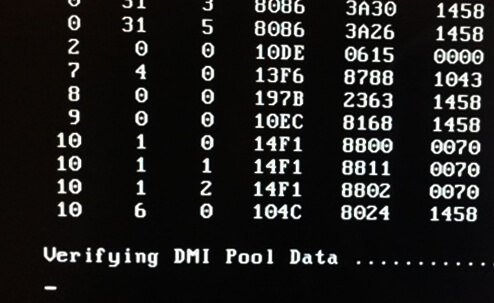
После включения компьютера проводится самотестирование, называемое POST, которым управляет BIOS, после чего идёт выстраивание таблицы DMI или её проверка. Сам процесс занимает секунды, поэтому вы даже этого не замечаете, но если с DMI возникла какая-то проблема, то система не может ничего сделать и виснет.
Причинами этого могут быть следующие моменты:
Как исправить ошибку Verifying DMI Pool Data?
Чтобы убрать появление данной ошибки нужно сделать следующие действия, а возможно целый комплекс.
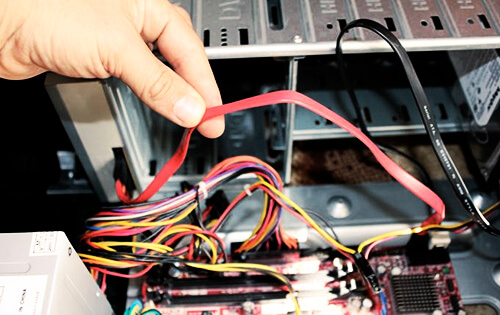
Даже если вы не были внутри системного блока, следует проверить подключение всех компонентов к материнской платы. Проверьте все провода, шлейфы и плотность подключения устройств.
Сбросьте настройки BIOS
Это можно сделать как из самого БИОСа, так и с помощью перемычек на системной плате возле батарейки CMOS. Пока что попробуйте программный сброс настроек. Во вкладке Exit должен находится пункт Load BIOS Setup Defaults, либо Reset Configuration Data. Если вкладок нет, значит пункт находится на видном месте, его нужно поискать.
Удалить или поставить старый компонент компьютера
Этот пункт означает следующее: если вы приобрели новое оборудование – жёсткий диск, оперативную память и после этого появляется ошибка, то следует изъять данный компонент, либо заменить на предыдущий, который стоял до этого. Конечно, не всегда вина в новом оборудовании, тогда вы можете поочередно отключать некоторые компоненты, а потом проверять работоспособность.
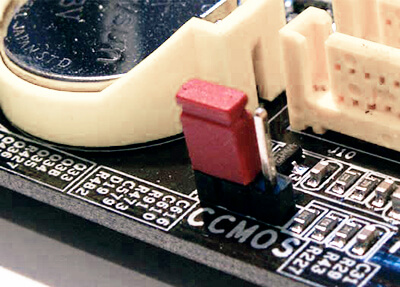
Очистка CMOS
Вам нужно полностью обесточить компьютер и немного подождать, далее вскрываем системный блок и находим на системной плате батарейку CMOS. Рядом с ней должны быть специальные перемычки, который нужно переключить. Таким образом вы вернете параметры BIOS к тому моменту, как будто он только куплен в магазине. После этого действия вам нужно будет указать правильные время и дату. Подробнее об этом здесь.
Если вы подозреваете во всех бедах жёсткий диск, то попробуйте использовать его на другом компьютере, а также проверьте на битые сектора. Для этого вы можете использовать системную утилиту Chkdsk.
Если ситуация очень запущенная, то может помочь перепрошивка BIOS, но и не факт, что поможет. Все необходимые файл и инструкцию можно найти в интернете или на официальном сайте вашей материнской платы. Данная процедура не такая сложная, но очень опасная. Если вы сделаете, что-то не так, то можете смело приобретать новую системную плату.
Как видим, проблема решаема, советую воспользоваться каждым способом, хотя бы один должен помочь. Наиболее часто исправляет проблему сброс настроек BIOS, можно начать именно с этого.
Amd data change update new data to dmi update success что делать
Как узнать оригинальный или сборка?
Я именно с этого диска устанавливал винду на другом компе уже пол года работает и всё нормально. А в этом случае как то не вышло. Почепу в этот раз появились эти слова:
Verifing DMI Pool Data.
AMD Data Change. Update New Data to DMI!
Update Success
И что с этим делать?
В основном ошибка связана с активаторами, поэтому я и спросил, оригинал у вас или сборка.
Хотя.
1. Какой у вас жесткий диск? Есть ли возможность проверить его работоспособность на другом компьютере?
2. Попробуйте обновить (скорее сбросить) BIOS.
Я же объясняю, что именно с этого диска устанавливал винду на другом компе уже пол года работает и всё нормально. А в этом случае как то не вышло. Диск нормальный. С него устанавливается. Он не поцарапан. С него уже устанавливалось. Что-то с компом видимо?
Я попробую проверить диск на другом компьютере.
Что значит обновить сбросить BIOS?
Сначала проверьте жесткий диск, если проблема в нем, то сбрасывать CMOS не потребуется.
Зашел к знакомому забрать этот самый диск и вижу. Сидит за компом мастер. Уже установил новую, свою винду, в придачу антивирус, проги, дрова. Говорит, что дело не в жестком диске, что сбросить биос полностью не удастся. Что дело совсем даже не в этом. А типа дело в том, что процессор был не плотно вставлен в разъём. Типа это распростронённая проблема AMD. В придачу содрал с хозяев 1700 рублей. Обидно дело не в диске а в компе. Я установил правильно и все необходимые проги и антивирус с ключём установил бы совершенно бесплатно.А в итоге я в их глазах оказался плохим.